Sunday, August 5, 2012

FPGA + Z80 + Memory

Apologies for the radio silence to anybody still following progress on this project. The last few months I've been rather busy with other projects, and the progress on ZX Prism has mainly been on-paper; as per the previous post, I've redesigned ZX Prism to base it around a real Z80 instead of implementing the Z80 on the FPGA.

The design's been completed and I've started realising it in hardware. I'm using a cheap FPGA mini dev board which basically contains a Cyclone II FPGA, clock source, serial EPROM and breaks out all the IO to pin headers. They cost around $20 (about 10 quid). I chose this board as there's several vendors on eBay selling them cheaply and hopefully if all works out, that'll mean the project's more accessable for others.


The prototype so far - Z80 (top right), 29c040 512K Flash rom, 3 x 628512 (1 Meg RAM, 512K non volatile RAM), 2 x 61256 (64K video memory), AY 3 8912A sound chip, Cylone II FPGA dev board, 7 x 74245 level converters to convert 5v TTL signals to 3.3v as used by the FPGA and vice-versa.

Still a long way to go, but definitely getting somewhere!

Saturday, March 24, 2012

Not dead, just resting!

Apologies for the lack of recent updates. Since the last update I've spent a lot of time rewriting the VGA handler so that it better matched Spectrum timings and also had enough clock ticks to create a bordered 512x384 pixl display. This was largely successful but I still could not get a lot of test software to work correctly - in fact most of it was still crashing upon loading. I've come to the conclusion that the soft-core z80 just isn't cutting it.

But I'm not giving up. Not at all! In fact, I've started work on a project similar to ZX Badaloc and Harlequin - a spectrum with an FPGA taking the place of the ULA (and much of the glue logic etc). Most of the work done thus far on the ZX Prism FPGA will be able to be reused. This has the added bonus that, with a minimum of hacking, the FPGA part would be able to be dropped into a "real" spectrum. Another bonus is that I'll be able to do a real edge connector without needing heaps of voltage conversion and FPGA pins...

I'm starting off with the CPU - I've got 10 a Mhz Z80A and a Z80 DMA chip. Once I get my GAL programmer working (or replaced), I'll effectively have a Velesoft Data Gear CPU daughterboard which can be tested on one of my Spectrum 128 machines....

Monday, September 19, 2011

Integration

Much recent development on the ZX Prism has been to integrate the video modes from the orignal (48K) Prism development into the new 256K one. This has thus far been pain free but of course there's nothing new to show! The only component I'd implemented in the original Prism which hasn't been integrated yet is the palette memory, and that's next on my list.

Remembering the issue with "offset" screen attributes in the original paletted solution, and having identified some other timing issues relating to the video output and interrupts, I'm rewriting the video creation module including making the clock resolution higher. This allows me to fit the palette lookups into the standard video read/store cycle. It should also mean a resolution of 512x384 will be possible.

The new video module will be written with the additional screen resolutions and colour decoding modes in mind (rather than them being retrofitted to Mike Stirling's video module).

Whilst designing the new video module, ideas for additional video modes have arisen, including an "overlay" mode where the shadow screen is used as a background for the main screen - any areas of the main screen which are colour 0 will allow the shadow screen to show through. This could be used, for instance, for games - where the sprites are animated on the main screen, and coloured backgrounds are drawn on the shadow screen. There'd still be attribute clash between the sprites, but not between the sprites and the background.  It's only 3 colours rather than two in each 8x8 attribute square, but it would provide a relatively easy way of sprucing up existing software.

Wednesday, September 7, 2011

A matter of contention

Once interrupts were fixed, I turned my attention to emulating the Spectrum's floating bus. Basically, I keep a copy of the last byte read by the video circuit. If the CPU reads an I/O address where the LSB is FF, I feed it a copy of that  last byte when the screen is being drawn, otherwise I send back 0xFF. At some point in the future, I'll alter this so that this is the response to ANY unused I/O address but it suffices for now.

The next thing to tackle was memory and IO contention. Whilst ZX Prism currently timeslices the bus between the video circuit and the CPU to avoid bus collisions, quite a lot of software uses precise timings (for screen efects etc).  After much messing around with alternatives, I bit the bullet and implemented IO and memory contention based on the 6C0001 ULA's circuit as described in detail in Chris Smith's ULA book. It didn't work. At all. In fact the screen erupted in a multicoloured mess.


Puzzled, I poked around and tried various things to the point of calculating propegation delays around the circuit, but to no avail. It was then I realised that I hadn't inverted the incoming clock signal. Hey presto. Prism initialised.


I didn't have much time for further testing at this point, but the couple of tests I did perform were encouraging although there's definitely a couple of things still need fixing:
  • Aquaplane - Split border effect is almost correct (it occurs just under 1 line early)
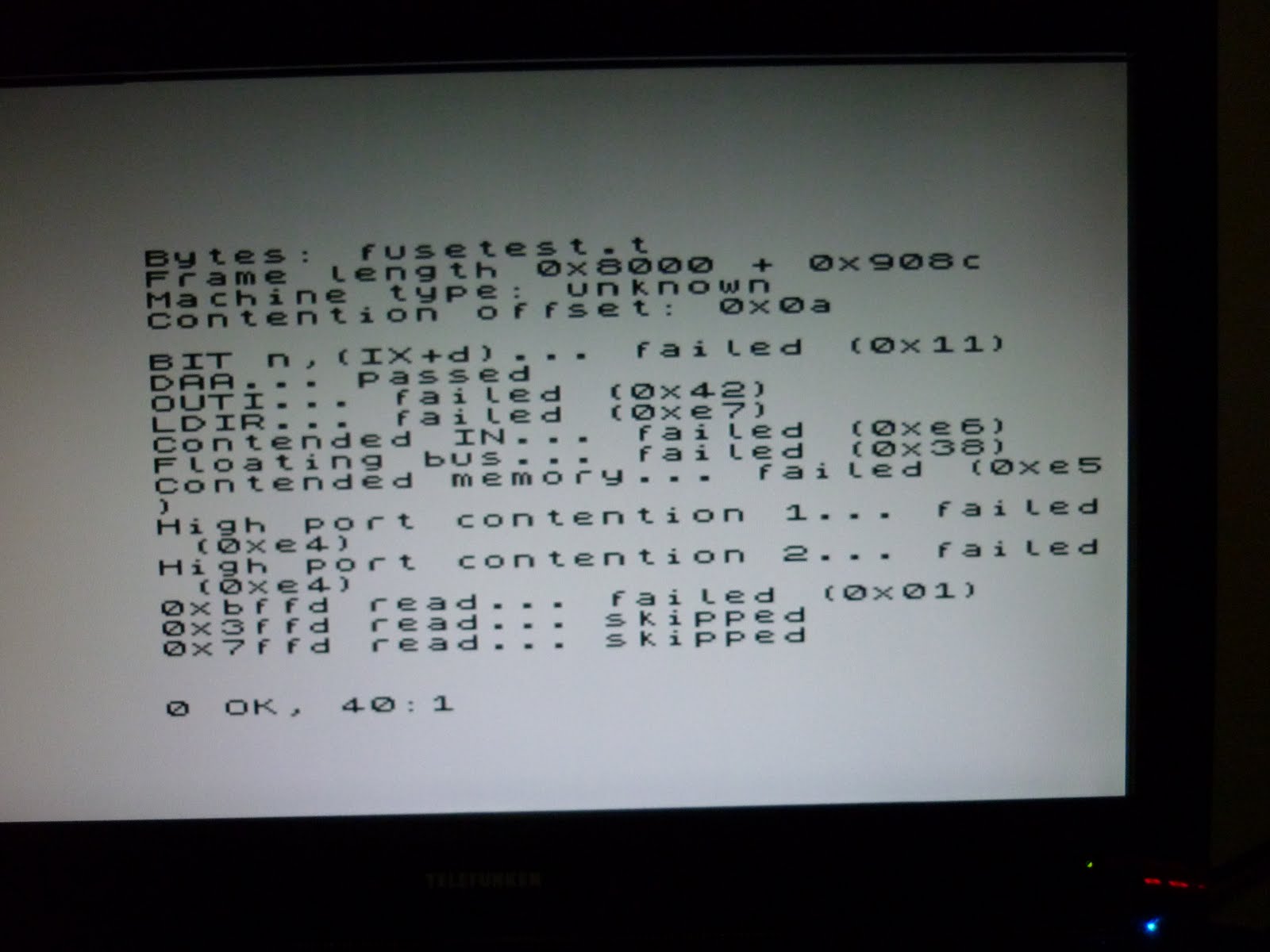
  • Fusetest - runs without crashing, but shows a contended frame length which is shorter than expected and most other tests show as failed
  • ULATEST3, Floatspy - both still crash
  • IR_contention - A very interesting effect here. This test shows four coloured boxes in the top and bottom border which should be parellel to each other. They are... however they are twice as long on ZXprism as they are on a real spectrum (or on the Spin emulator in 48k mode) - in fact the whole line wraps round on-screen. Looks like I need to take another look at the video and interrupt generation.


You will notice that I've implemented a 48K Spectrum contention solution on a machine which is compatible with the 128K Spectrum. I will be changing the contention so that it contends the appropriate memory pages in the future.

Sunday, September 4, 2011

Interrupts...

This last week has seen me working with interrupts of various types.

Firstly, the literal. Mike Stirling released a new version of FPGASpectrum during the week and I took some time from working on ZX Prism to check it out. I was impressed. Mike has very quickly added a number of new features

  • AY Soundchip core
  • IO Port 7FFD controlling RAM/ROM paging as on all 128K Spectrums
  • IO Port 1FFD controlling ROM and CP/M memory modes as on the +2A and +3
  • ZXMMC+ (allowing the Spectrum to access SD Cards and adding another 128K of RAM and 128K of ROM)
This left me in a quandry. I'd been going to add 128K support to ZX Prism as part of the memory expansion to 512K (or 1MB if I could get the DE1's DRAM working), and whilst I'd been going to add IDE support to ZXPrism (via a divIDE interface), the ZXMMC+ allows access to the SD Card slot which is already on-board.... So... do I use THIS as the new foundation for ZX Prism and start merging in the changes I'd made to Mike's original VHDL, or do I try to merge Mike's changes into ZX Prism? 

Either way, I had to rethink how I was going to do Prism's expanded memory (as ZXMMC support uses 256K of the DE1's SRAM)

I decided on the former - after all, I knew exactly what changes and additions I'd made for Prism. Memory-wise, the upper 256K of the SRAM is used by the ZXMMC+ implementation. The lower 256K of the SRAM will be switchable in 16x16K pages at 0xC000 (using the Pentagon 256 decoding of port 0x7FFD to switch it). I'll be using on-FPGA memory cells for the video ram (pages 5,7,D and F) due to the way the video subsystem will be reading it - this gives another 64K of the SRAM available for.. something.

So, much of my time recently has been spent on integrating my changes into Mike's new codebase. As I'm new to VHDL and FPGAs, this has been a learning experience as Mike has changed from using a schematic  top level to using a VHDL top level - therefore my progress is slower than it might have been otherwise. All good learning though.

As part of integrating the ZX Prism code, I decided to take a look at how the Spectrum's interrupt was being generated (aha, there's the other tie-in with the post's title). 

Some code on the Spectrum relies heavily on certain features of the Spectrum hardware:
  • accurate generation and duration of the Spectrum's video interrupt
  • accurate emulation of memory/IO contention (ZX Prism's bus is arbitrated by timeslicing so there's no need for contention in order for things to work, but it IS needed for Spectrum code to run at predictable speeds)
  • the Spectrum's floating bus

I'll be looking at all of these things (as I know Mike is,), but the easiest thing to look at was the video interrupt, which I coded to behave precisely as Chris Smith describes in the ULA book.  Once this was done, I tried running some of the software which wasn't working correctly:

  • ULATEST3 - still crashed
  • Aquaplane - border effect still starts too early on the screen
  • FUSETEST - no longer crashes

Tiny steps...

Tuesday, August 23, 2011

Paletted 256 colour mode

ZX Prism currently has 3 different screen modes. The first is, of course, the standard ZX Spectrum mode (256x192 pixels, 8 colours, 2 per 8x8 attribute square, 2 brightness levels - 1 only per 8x8 attribute square). The second is a 32 colour mode as pictured in a previous blog entry (256x192 pixels, 8 colours, 2 per 8x8 attribute square, 4 brightness levels, 1 per 8x8 square).

The third mode is the one which I've been working on recently and had success with last night. It's one of several proposed 256 colour modes. This one uses the attribute byte to determine the logical ink colour (0-255). The paper colour is determined by the ULA2 border colour stored in a latch at 0x4E3B.

Testing 256 colour mode (mode 72) - random palette

Testing 256 colour mode (mode 72) - random palette

Atic Atac loading in 256 colour mode with a randomised palette.
Note the effects of the timing issue on the Ultimate logo
The rainbow stripes don't work when there's only one paper colour!

(C) 1982 Sinclair Research in lime green. 
It had to be done.

There are a number of bugs/"features" with this mode:

  • Background colour is dictated by the ULA2 border colour. The ULA2 border is only active when the ULA border is set to black (BORDER 0). Careful manipulation of the ULA2 border colours during the screen refresh should be able to increase the number of colours on-screen. Other, similar effects can be achieved by switching screen mode at appropriate times during screen refresh.
  • It follows that setting the ULA border to a colour other than black means you can have a border that doesn't match the 'paper' colour. If the ULA border colour isn't matched in the 256 colour palette, then you have an extra colour on-screen (if anyone's counting).
  • A noise effect is notable on the colour whose palette entry is being updated due to lack of contention on the dual-port palette RAM. This could potentially be fixed, however it could also be exploited as a special effect. For now I'm leaving it alone.
  • The pixel colour can be selected from BASIC by manipulating ink, paper, bright and flash values. 
  • As can be seen from the pictures - there are timing issues caused by the palette lookup cycle (at least I think this is the cause). These will need to be fixed, however the display being created is stable, and the which is very encouraging. 
Having a single paper colour for the whole screen isn't particularly useful for detailed graphics. Other similar paletted modes are to be implemented which will be more useful:
  • 16 inks, 16 papers. Paletted. 2 colours in each 8x8 attribute square
  • 32 inks, 8 papers. Paletted. 2 colours in each 8x8 attribute square
  • 64 inks, 4 papers. Paletted. 2 colours in each 8x8 attribute square
  • 128 inks, 2 papers. Paletted. 2 colours in each 8x8 attribute square
  • 256 colours, Paletted. 2 colours in each 8x8 attribute square. 2 byte attributes.
  • The above modes, but with 8x1 pixel attributes.
  • ULAplus

Sunday, August 21, 2011

Clocks

One other major thing that has changed recently in ZX Prism is the master clock frequency.

Mike's original FPGA Spectrum source derives the CPU and video clocks from a 28MHz phase locked loop. The 14MHz video clock was derived from every odd tick (equalling four ticks for every eight of the master clock: 1,3,5 and 7) and the 3.5MHz CPU clock was derived from the first even tick of every eight (tick 0). The 7MHz CPU mode was derived from ticks 0 and 4.

Recently, to prepare for the more complex video modes and to allow faster CPU clock frequencies I doubled the master clock frequency to 56MHz. For now, I've adjusted the way the CPU and Video clocks are derived so they still run at 14Mhz and 3.5 or 7MHz.

The on-FPGA palette memory seems quite happy at these speeds, so all is looking good for the new screen modes.

The next thing to do is to increase the video clock to 28Mhz and adjust the read/store cycle for reading the data and attribute bytes. Some of the new screen modes need more data to be shifted around than the standard Spectrum mode. I'll be attempting to do the majority of the screen modes with the same contention patterns (at least when the CPU is running at 3.5Mhz) so that games with special screen effects (split borders etc) work. The chunky and planar screen modes will probably incur more contention - though the CPU speed can be increased to compensate of course.

Speaking of contention... I've still not had complete success with implementing it - however I am a lot closer now. The increase in master clock frequency and the redesign of the video decode/encode subsystem gives me a chance to change how the timing of everything fits together - including ensuring contention is correctly applied at faster CPU speeds to avoid the crashes that currently happen when the CPU is running at 14 or 28MHz. Time to get the pencils and paper out and start counting clock ticks...